Search This Blog

Sunday, 31 May 2015

DATABASE ADMINISTRATION

DB01-ANALYZE EXCLUSIVE LOCK WAITS
DB02-ANALYZE TABLES AND INDEXES
DB12-DB BACKUP MONITOR
DB13-DBA PLANNING CALENDAR
DB15-DATA ARCHIVING DATABASE TABLES

CONFIGURATION T CODE

Configuration
FILE-CROSS CLIENT FILE NAMES/PATHS
RZ04-MAITAIN OPERATION MODES AND INSTANCES
RZ11-PROFILE PARAMETER MAITENACE
SE93-MAITAIN TRANSACTION CODES
SM63-DISPLAY/MAITIN OPERATING MODE SETS
SPRO-CUSTOMIZING INITIAL SCREEN     

SWU3-CONSISTENCY CHECK CUSTOMIZING

SAP Tcode for monitoring

Alert Monitoring
AL01- SAP ALERT MONITOR
AL02-DATA BASE ALERT MONITOR
AL04-MONITOR CALL DISTRIBUTION
AL05-MONITOR CURRENT WORK LOAD
AL16-LOCAL ALERT MONITOR FOR OPERAT. SYST.
AL18-LOCAL FILE SYSTEM MONITOR

RZ10-CCMS MONITORING

Friday, 15 May 2015

How to create a job in SAP basis--A step by step guide

In this post i will tell the how to create a job in SAP BASIS. This is the step by step guide for creating the job in sap basis.
1. login with your master password and username

2. Execute the sm36 t code for creating the job


3. Continue with that dialogue box. Click continue for create.

4. Then it will show the general job information and put our requirement i.e Job name, Job class- (high, low, medium) job status, Target server.

5. Defining a job step by three option a)ABAB program step b) External command as a step
      c) External program as a step. For my convenience i choose ABAB program step

6. Define an ABAP program job step. In this step three option asking ABAP program name, Variant, Execution language.

7. Multi-step jobs shown if you want means choose otherwise not choose.

8.Jon definition:Start conditions. i.e Immediately, date/time, after job, after event, at operation mode switch, start on workday, do not release job.

9. Start the job immediately list the nob name, job class, target server, steps defined, start condition.

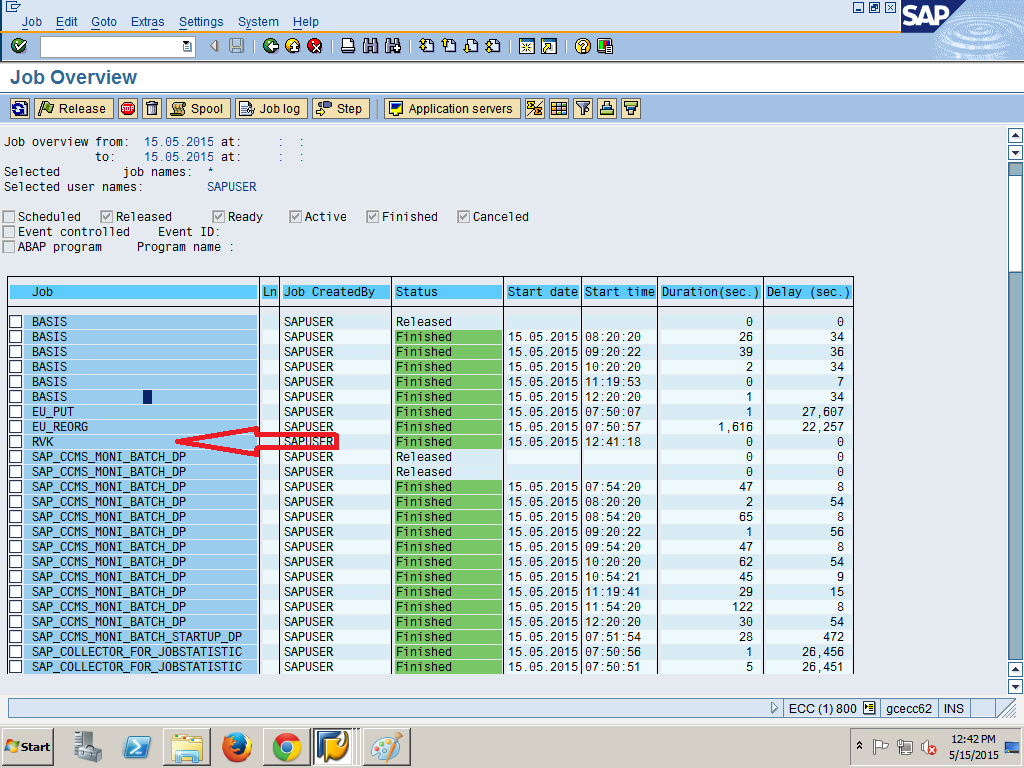
10. Bottom of the page shown the job name VRK saved with status released
11. Job has been created and view our job in sm37 tcode.


Thursday, 14 May 2015

Contact me


V.Rajeshkumar M.E Department of ECE
Melmalayanur village and post
  
Gingee T.k
Villupuram Dist
Tamil Nadu 606611                                      
Cell : +919566937635 or +919092398775
Email id : rajeshkumarece73@gmail.com

Wednesday, 13 May 2015

ST22 ABAP dump analysis

You can view the ABAP run time errors that have occurred in an ABAP system as well as relevant dumps in client.
This error can save in local file and also print for user reference


.

sm13 monitoring update statistics

In sm13 you can monitor the update statistics if unwanted updated in particular user means you can delete or cancel that update and check critical update and non critical update here. list the update activity by date and time.