Search This Blog

Thursday, 7 May 2015

How do create a user in sap basis

In Sap basis user creation is very important task . In MNC many number of user can be created provided for user requirement. Two types of user creation sme role with different names creation and different role with different name creation. Ok Now single user how can be created in SAP basis.

1. Login with user name and password


2. excute the t code su01

3.To create the required user name.


4. then you to enter the address and details bla bla bla


5.Carefully choose user types in logon data (from dia, system comm, service, Reference)

6.If initial password for two times enter.(if logon first time you have to choose the new password)

7.Very important thing in user creation is roles creation, you cannot assign roles means cannot create the user name and password. roles assiging is very important.

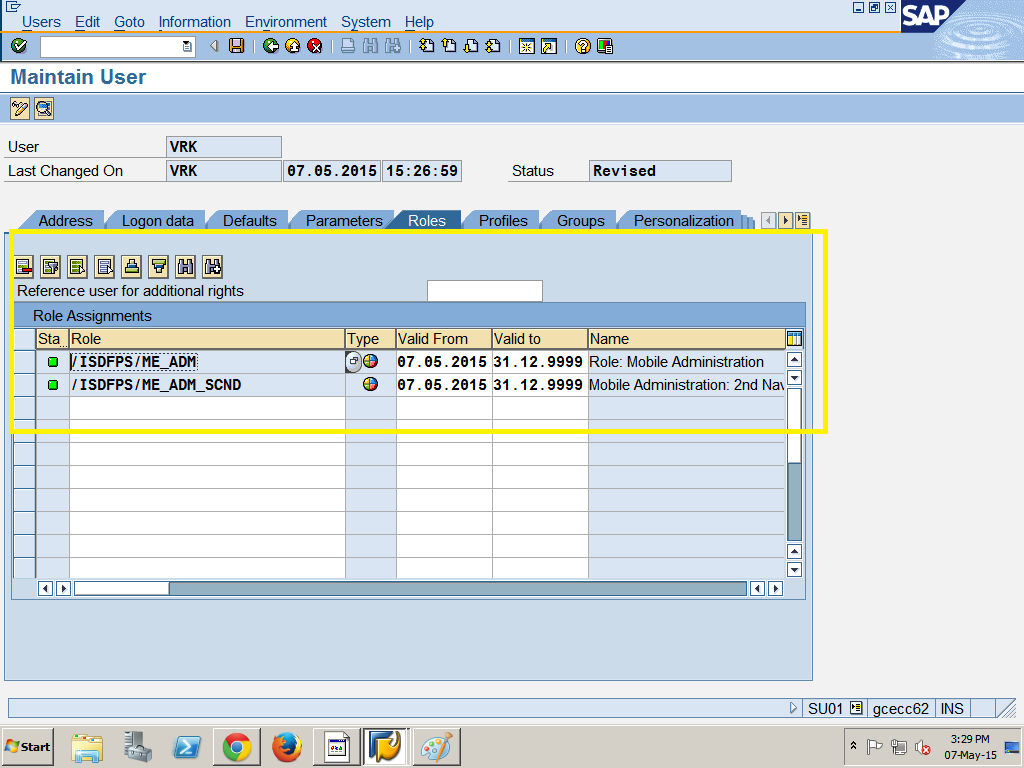
8.Select the profile tab then choose the required profile SAP ALL--R/# full authorization SAP NEW--> newly updated authorization asiigned automatically.

9. Enter the save button then your user name successfully created.

Note : Full permission is provided in master user name and password only so you have to lock or unlock to that user such as password changing display etc.

Thank you have a nice user creation.

how do delete a client in sap basis

Deletion of client in sap basis is easy one. once executed deletion t code then cannot be retrieved.
 1. log on to the master user name and password
2. execute the t code scc5
3. delete the background process
4. delete entry from T000
5. Status of client deletion process using SM50
6. Work process overview in BGD( if deletion completed )

Client Import and export

 By using export and import client copy you have to copy the different location or access the data from other location. Viewing the impor and export client copy Tcode scc3. One important thing is network connectivity must be strong.
Step1: logon on the target system .
Step2: execute the tcode scc4
Step3: by using the SAP*, pwd is PASS.
Step4: Execute t code scc8---> import client copy
Step5: Fill the required information about data and profile.
Step6: Assign the process parallel or single process, single process may require lot of time.
Step7: Schedule the client copy in background.
Step8: Client copy available at scc3 


How do import the client in network: same procedure to be followed ---log on to the newly created target client--->start the stms-import----> selaet the transport requests generated by client export--->PKTK000151 like three types---> enter the tat code STMS-IMPORT--->import is done means execute scc7--->then schedule the job and background process---> logs available at scc3.

Remote client copy

             By using remote client copy you have to copy the different location or access the data from other location. Viewing the remote client copy Tcode SM59. one important thing is network connectivity must be strong.
Step1: logon on the target system .
Step2: execute the tcode scc4
Step3: by using the SAP*, pwd is PASS.
Step4: Execute t code scc9---> remote client copy
Step5: Fill the required information about data and profile.
Step6: Assign the process parallel or single process, single process may require lot of time.
Step7: Schedule the client copy in background.
Step8: Client copy available at scc3 

How do create local client copy in sap basis

                   Hi today we are going to see the how do create a local client copy in sap basis. This is the basis one , no modification in master data so we are going to copy default client then this default client can be copied to our database. This is the step by step procedure for copy the local client copy.

Step1: Our aim is to copy the client to client so, you have to log on our master login with our password. my point of view i set source instance client= VRK --212, target instance client =VRR - 202.

Step2: Afetr the login our details you have to enter t code sccl  --> local client copy


Step 3: after enter login details then below dialog box will appear. Enter the source client and their details with our convenience.
Step5: Then you to choose the execution process, there are three types of execution is there background execution, parallel execution, you have to choose any other option based on our requirement. then our dialog window below appear.
Step6: after excute our of local client copy then see our logs in tcode scc3


Wednesday, 6 May 2015

Client copy types

In SAP Basis there are three types of client copy is there.

1.Local client Copy
2.Remote client Copy
3.Export and import client Copy

1.Local client copy:-
         This is the copy which copy the client within the same instance. It is done by the transaction code SCCL.
2.Remote client copy:-
        This is the copy which copy the client with different instance. its is done by transaction code SCC9.
3.Export and import client copy:-
   This method is used to copy the client with different instance. It is done by using the code SCC8.

Note: All information logs are monitored in SCC3.

SAP Basis definition

Basically SAP basis is very easy one their work is monitoring the  system like system admin. Who will install, configure, update, patch, migrate, troubleshooting any technical problem on SAP system and manage the all the daily operations for specific sap system or system landscape.

--> admin of RDMS
--> interface between the system components and the basis components, which includes also the development platform for SAP applications and data dictionary
--> system admin, user admin, monitoring tools basis components in SAP system.